 Google Business Profile is Google’s way of verifying your business and its actual physical address, to ensure that you do operate where you say that you operate. And it is FREE. Read this short guide to see what you can do to optimise your Google profile.
Google Business Profile
GMB or Google My Business originally, which makes more sense to people, is now called GBP Google Business Profile. In 2022, this became the ‘official’ name. Whilst it is a bit confusing, the new title ‘Google Business Profile’ does make it somewhat easier to understand what it is exactly.
It is very important for local search engine optimisation SEO. Also to help you manage your online presence across Google’s various tools, including Google Search and Google Maps and Google Reviews which are becoming more and more important. These Google Business Profile entries also populate Google Maps and the Knowledge Graph and Local Search Results. Google also has a separate ML or Machine Learning Shopping Graph for eCommerce website products and reviews.
*Take your Google reviews very seriously and start building them up now by asking clients to give you a positive ‘wordy‘ review and making it as easy as possible for them to do so. Be sure to thank anyone who gives you a review, right there in Google Business Profile. Google likes to see you engaging with your clients or reviewers. This is just like Trip Advisor for restaurants. It is not a replacement for a business website, far from it, but it is important to have for Google search purposes. And it adds Social Proof for visitors, who see you engaging positively with your customers.


Think of it as a FREE website at Google for your business profile in search, where you can decide what it says about you in Google and how it looks or portrays your business. Ideally, Google would love to have you use this as your website too. They want to keep people on their own platform as long as possible.
The chances are that there is already a GBP entry of some sort for your business which has some information on it, but possibly not what you want to see. Check the information, especially the telephone number, map address, area code and website link, as well as any photos.
Google Reviews
Google planners or lead developers are working on the basis that if you get good independent reviews in your Google Business Profile entry, you must be good at what you do. But they do make people jump through a few hoops in order to register a review of any sort on your Google Business entry. It becomes self regulating, the Community ranking their own verified members.
The logic is good enough, people have to show that they go through some inconvenient steps and want to go to the trouble of doing a review because it matters enough to them, positive or negative. It also stops spammers or manipulators of Google rankings using black hat techniques. What is not to like about this policy? Someone who wants to log a review has to have their own verified Google account, which supposedly identifies them. This is a great way to keep us all honest and help prevent abuse of the system. Although it still happens in a big way. People trust these independent reviews. Check your Google Business Profile entry regularly and keep it up to date, answer any questions and respond to any and all reviews. Do say thank you and never get in to a dispute with any reviewers. And yes, some people game the system by creating loads of bogus Gmail entities, in order to register more reviews or even post negative reviews on competitors website. Google is working on a way to reduce this.
If you do ever have any issues with reviews we recommend starting a thread and ask for help on the Google Business Profile Help Community Forum.
Tip: Think of SEO Search Engine Optimisation as you telling Google how wonderful you are and how much of an Authority you are. Reviews would be other people telling Google how wonderful you are. And how much of an Authority you are too.
Setting up Google Business Profile
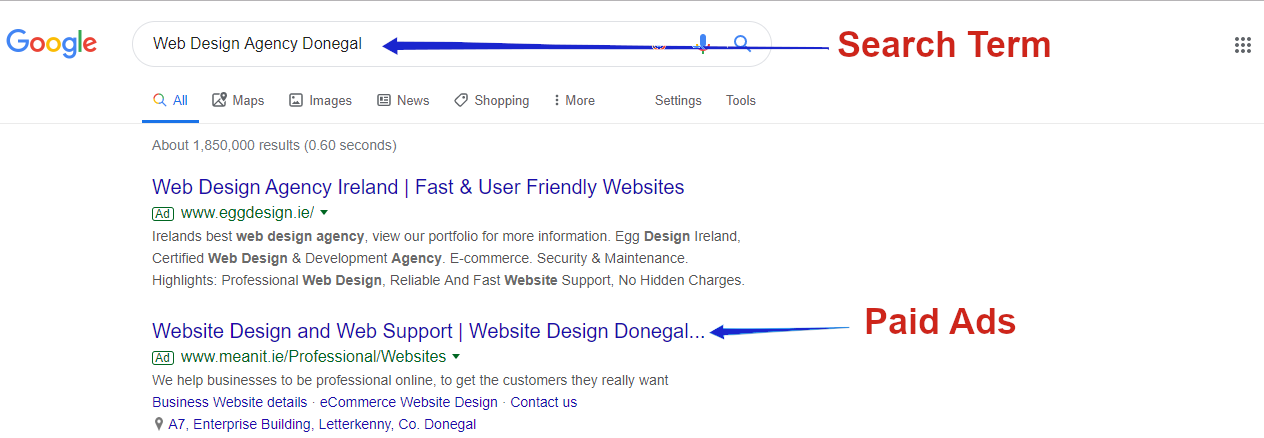
Firstly, do a search in Google for your business, your entity, which should be your own business name, to see if it is already listed. Try using this piece of code in the search bar https://www.google.com/search?q=meanit-web-design replacing our business name with your business name. It will appear in the Google’Knowledge Graph’ on the right hand side of the SERPs or search engine page results – see image above for our own entry. By all means try searching a few variations of your trading name to double check if there is an entry. If it is appearing, then click on the ‘Claim this Business’ to take control of the entry and populate it with your correct information and good relevant photos.
If it does not appear, register for your own Google Business Profile or entry at https://www.google.com/business/ and ensure you pick the right Category for your business.
Note: You must be logged in to your Google account to edit details, use your business gmail account. See Google guide HERE.
Note: The GBP app has been retired, you can edit now via Google Maps or in Google search.
By verifying and correcting your business details, you can both help customers and potential customers find you and also tell them about your business, the services you offer. And, where to find you and what existing customers think of your service.
Once you try to register or verify your business, Google will call you or ask you to send a video from your premises, or perhaps send you a physical postcard with a verification number to use to confirm that you have received it at a specific physical address – this is the slowest but best option. Include your exact area code or Eircode. Or you may be called at your landline number and an automated voice will call out a verification code to use to confirm your entry. The postcard will take a few days and maybe a few weeks. If you do not receive it, try again until you get it. But do persist as this is very important. Google is effectively creating its own version of the Golden or Yellow Pages. You need to appear in it, especially in ‘local’ search. They may ask for video proof that your location is real, so they will want to see signage etc.
Google Business Profile Reviews
Once it is set up, you can proactively ask people to give you a good Google review, ideally with a photo from your location to prove they visited. And yes, you do risk getting bad reviews too. To be honest, you might be better to get a few poorer reviews too as all 5* would look to Google like you orchestrated them, by asking friends to give you a good review. Again, Google has an algorithm to avoid this scenario. You should indeed ask happy clients to do just that for you. Remember to say Thank You in the actual review section. Again use the opportunity to add keywords in your response, such as referencing your service or location.
How do I find the URL or link for my Google business page to send to customers when asking for a review?
Go to https://www.google.com/business/ and sign in. You can click on Edit Your Business Information.

On the right you will see Get More Reviews and Share Review Form – click on that to get a link to send to customers to request a review. And you will have the option to copy and share a QR code, which you can do through WhatsApp or any messaging platform.
Note: You do not have a way of clients visiting a page on your website to add a Google testimonial. They add them in your Google Business Profile entry as an independent review. Ask them to write wordy reviews with good keywords. The you can reply in a ‘wordy way’ to thank them for their review. This is all good for helping Google understand what you do for clients. And what they think of your work.
Alternate method – slightly longer, same result.
Click on the “Info” tab in the left menu if you are not already on the info page.
The top right of your info page will have the statement “Your business is live on Google.” …
Click on “View on Search” and a new window will open.
Copy the URL or link from the new window to be used as your own link to send to potential reviewers.
Check out this Whitespark Bar chart titled Ranking factor group change over time showing GBP and review signals rising, link signals declining, plus on page, behavioural, citation, personalisation and social signals from 2018 to 2026.
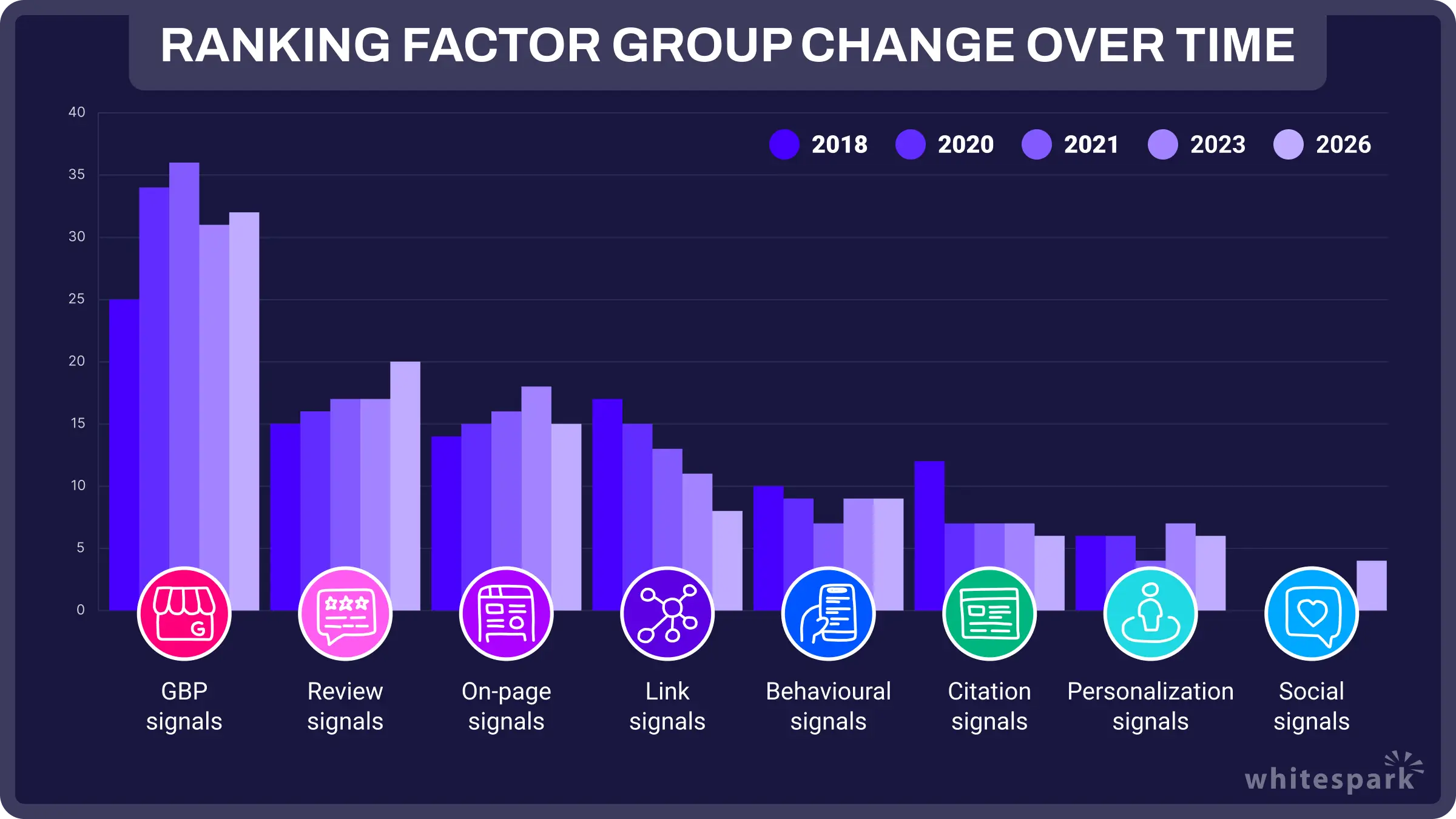
Image courtesy of Whitespark
Multiple locations – Get a link to send customers to ask for a review for one of your locations
On your computer, sign in to Google Business Profile.
If you have multiple locations, open the location you want to manage.
In the left menu, click Home.
In the “Get more reviews” card, you can copy your short URL to share with customers.
Loads of help always available at Google HERE and at Support.Google.com
Tip: Get a link to share with customers to ask for positive reviews. You can log in at https://www.google.com/business/ . Then click on Info on the left and then click on Share Review link on right. You can edit the link to personalise it by inserting it in a word like ‘Click Here to Review our business’. Our shortened personalised link is https://g.page/r/CXXKNh9BulenEBM/review
Add a new location to a location group
Sign in to Google Business Profile.
Click Manage locations. …
Use the drop-down menu to choose a location group. …
Click Add location.
Enter the business name, location, and other details.
Follow the prompts to create the new listing.
If you have not set up a Location Group, then simply click the blue ‘Add Business’ button to create a new property, fill in the details again, name, address including Eircode, phone number, services offered, photos for this location etc.
Add owners & managers via Maps or in Google search.
On your Android phone or tablet, open the Google Maps or Search. …
Find your property. …
Sign in to Google Business Profile.
Click the gear icon or three dot menu on the location group/business account you’d like to manage and click Manage users.
Add the email address of the user to whom you’d like to send an invitation.
Add owners or managers via pc/laptop or via Maps or in Google search.
Sign in to Google Business Profile.
Click the gear icon or three dot menu on the location group/business account you’d like to manage and click Manage users.
Add the email address of the user to whom you’d like to send an invitation.
Change your address in Google Business Profile
Sign in to Google Business Profile.
Select your current business location or property, then click Manage Location.
Click the ‘Info’ button on left
Click the edit button, the little icon
Click Apply. …
Click OK
Ideally you want to get a new postcard sent to your address to prove that you do have this new physical address.
Tip: Add some optimised photos taken at this new location including photos of the premises
Note: If you ever change your address, make sure that you change the NAP on any website where it appears. Name, Address and Phone numbers should be corrected anywhere it appears on the web.
Request ownership of a Google Business Profile
Follow the instructions HERE. If you can’t find a “Claim this Business” or “Own this business” link on the Business Profile, you’re likely already an owner of the business. On your profile, search for a “You manage this business profile” badge. Find your business on Google Search or Google Maps. Under the Business Profile, click Claim this business.
Google Business Profile Messaging
Google added the option in early 2021 to send messages through the Google Business Profile, initially on the Desktop view so far. Full details HERE. Only enable this if you are willing to respond quickly to any messages you may receive. However, this feature is no longer available as of July 31, 2024.
Tips for using Google Business Profile well
1. Ensure that the listed telephone number on your Google Business Profile listing is the same as the one on your website or landing page. Ideally, use a landline number that is attached to your physical address
2. Ensure that the NAP Name and address and postcode are the same on your listing and on your website, in exactly the same layout or format.
3. Add good images of your premises, 3 inside and 3 outside – you can even get a Google certified photographer to do it. Use your own phone as it will generate geo location tags in the photos.
4. Optimise the photos by giving them good names that explain about your business products or services. Give all photos relevant names with keywords such as ‘website designers’ for us or ‘web design agency office’
5. Add an accurate description of your business that will get people clicking, explain what you do and again use relevant keywords
6. Make sure the name of the business description is good, like ‘website designers Donegal’ or ‘Digital Marketing Agency in Raheny Dublin 5’ – be as specific as you can be.
7. Ensure that you are listed in the right Category in the Google options, we are ‘website designers’
8. Encourage Reviews – have a plan, this is critical. And ask people to mention relevant keywords about the service you delivered, such as SEO services or website design in our case. Include location such as Donegal or Dublin. Get as many well worded 5* reviews as you can on an ongoing basis. People will choose a business with more 5* reviews than others. This ‘Social Validation is very powerful’. It is not a numbers game, so having 1000 reviews will not necessarily impress Google, but it will impress the visitors. Google seems to look at average stars as a ranking factor, rather than just numbers. Again, getting one review a week is better than getting 100 all on the same day. Keep it constant, as Google likes that.
9. Say Thank You – when someone gives you a review, always respond positively, using proper key words.
10. Ask and answer questions in Google Business Profile in a timely fashion
11. Add the option for people to make an appointment through Google Business Profile if it suits you.
12. For the more technical or the developers among you, you can also add Mark Up schema to help Google understand what you offer.
13. By all means post articles in GBP, they might disapear or have no relevance after a month, but the activity is good for Google. Use the opportunity to mention your location, such as Dublin 24 or Donegal Town etc. Images should be about 600 x 400. Add your Logo on each if you can. You get 1500 characters so do write 300 to 500 words. Link out to a longer version of the post on your website using the Learn More button option. By all means add links to your Social channels if that works better. You can share the link to a GBP post in your social channels. Add your NAP Name Address Phone Number if Google lets you do it. Or a link to a related previous post.
14. Keep your business hours up to date especially if you have to amend them due to a crisis, Pandemic or a holiday etc.
15. Add a relevant video if you have one or more – optimise these videos too
16. Add a well optimised photo regularly to show your products or examples of your work, Adding one a week is better than posting 100 at the same time. Do post 100 over time by all means.
17. Allocate 30 or 40 minutes a week to manage your GBP and keep it updated by getting more reviews, posting articles or answering questions.
18. If you have multiple locations, ensure they all appear. And add photos of each premises, inside and out.
19. Ask potential reviewers to include your location in their review – “Best web designers in Donegal” or “Best website designers in Dublin”
20. Ask reviewers to include a photo, an original one, and ideally name it with something relevant. “Bridge Bar best Fish restaurant in Ramelton Co Donegal”. Google Vision is AI or rather machine learning that allows Google see there is a photo and the tagging shows the geo location, as in Ramelton. And it can determine the photo is a building or a plate of food, possibly even that it is a photo of fish.
Spam Reviews
You will probably get some of these Spam Reviews or unfair reviews. You can ‘Flag’ them as inappropriate to Google. If you need help from Google go to https://support.google.com/business/gethelp and report the issue. This can be an annoyance and it can be very frustrating when you try getting Google to remove the spam. (They are notoriously slow to reply or take action) Concentrate on getting more 5* wordy reviews to dilute the effect of any negative reviews. And ask some people to flag the spam too. The more the merrier. If you get a negative review, try not to let it annoy you.
Google Business Reviews plugin can be installed on your website and license activated. However, for it to connect the reviews to the website you need to connect the API to the Google account the Google Business Profile account is set up on. There are two ways we do this see below:
1. You can send the website developer the login details for the google account the GBP is set up on and they will set it up on that including Google Analytics and Search Console.
2. Or the developer can create a new Google account for you eg: [email protected] and get you to add that account as an owner on the original GBP account. The Developer can set up Google Analytics and Search Console on that account.
The reason for two options is that some clients do not like giving access to their personal google accounts which is understandable.
Social Media feed – Which Social media feed do you want to appear on the website? We recommend https://smashballoon.com/social-wall/ if you want to have all your social feeds appear in the one place, alongside the Google reviews to add more credibility.
Warnings and Updates from Google
Google indicated way back in July 2016 that businesses who do not log into their “Google Business Profile” account frequently can risk losing their verification and this would affect businesses adversely. Keep your name and address entry details all up to date, but do not change it too often as each change affects your standing, even if just temporarily. Google likes to see stability, history and like everybody else, hates or distrusts too much change. However, do keep adding content to GBP such as blog items or service updates. For more advice on GBP see Googles own information page HERE.
THANK YOU – You can help us now by reviewing us at https://g.page/meanit-web-design-agency?gm or in Google Business Profile THANK YOU.
By all means do share this article, if you found it useful.
Google Warnings and Updates
To maintain verification and trust, regularly log in to your Google Business Profile account. Keep profile information stable and add fresh content, such as blog posts and service updates, to maintain an active and engaging presence.
Optimising your Google Business Profile is an ongoing process that enhances online visibility, reputation, and trustworthiness. Engage with your audience, respond to reviews, and stay proactive in managing your profile for long-lasting benefits.
AI Overviews previously known as SGE Search Generative Experience
Another innovation in Google that you should be aware of is AI Overviews which went live in May 2024 for the USA and is being rolled out across the globe in 2025. AI Overviews will allow users to search in new or different ways, such as asking follow-up questions in written or voice searches, whilst staying in the Google platform. Much like talking with an assistant or AI Artificial Intelligence assistant, AI Overviews is the next level in search results, which will make search more intuitive for people. You could refine your search multiple times and stay on that one Google page. However, the way it works will pose challenges for SEO and for marketing in all firms.
AI Overviews is powered by a number of LLM Large Language Models, including MUM And PaLM2. Google has been using AI for years. The results presented in any given search will look different for everyone. Answers might include bits of information gathered from a number of sources or websites. The layout on a results page will also look different going forward, especially for eCommerce. This is all still very much in development so constant change is guaranteed.
And as of early 2025 Google has released AI Overviews in Ireland which is an updated variation of SGE. It allows people get an answer to their search term without leaving the results page. This does create a challenge for SEOs who are optimising for top of the funnel searchers. Your Organic Traffic figure will take a hit.
Introducing AI Overviews or SGE Search Generative Experience
The Future of Search
Google is once again at the forefront of innovation with its AI Overviews or Search Generative Experience (SGE). This groundbreaking development is poised to revolutionise user interactions with search engines. AI Overviews empowers users to conduct searches in entirely new and dynamic ways, including asking follow-up questions in both written and voice searches. It’s akin to having a conversation with an AI assistant, taking search functionality to the next level by making it more intuitive and user-friendly.
Challenges for SEO and Marketing
However, this exciting leap in search technology presents unique challenges, especially for Search Engine Optimisation (SEO) and marketing professionals. Adapting to AI Overviews’s dynamic and conversational nature requires a reevaluation of SEO strategies and marketing approaches across all industries. Traditional methods may need to evolve to align with this innovative search experience.
AI Overviews’s Technical Foundation
SGE draws its power from a suite of Large Language Models (LLM), including MUM and PaLM2. Google’s continued leveraging of artificial intelligence (AI) capabilities underscores its commitment to pushing the boundaries of search technology. The future of search results will be dynamic and personalised, with answers sourced from various websites and sources.
Constant Evolution and Change
It’s crucial to note that AI Overviews is still in the development phase. Users can anticipate continuous changes and enhancements as Google refines this cutting-edge search experience. One significant impact will be on eCommerce, where search results page layouts will undergo substantial transformations to accommodate the evolving nature of AI Overviews.
In summary, AI Overviews is poised to usher in a significant shift in how users search for information online. It promises a more conversational and personalised search experience, while also presenting challenges for SEO and marketing professionals adapting to this dynamic landscape. As Google continues to develop and refine AI Overviews, search results, and user experiences will evolve accordingly.
Google Verified (Replacing Google Guaranteed)
The New Standard for Service Trust
In October 2025, Google unified its verification badges, replacing Google Guaranteed with a single, SEO-focused and authoritative Google Verified badge.
This update is designed to simplify trust signals in local search, particularly for geographic and AI-enhanced results, by applying one high verification standard across a broader range of service providers.
Key Change – Money Back Guarantee Discontinued
The most notable change is the removal of the consumer reimbursement feature:
- The money-back guarantee is no longer available. The former Google Guaranteed badge offered homeowners up to $2,000 (approximately £1,650) in compensation, but this safety net has been phased out.
- The verification process remains unchanged. Service providers must still undergo strict screening, including background checks, license validation, and insurance verification, to earn the Google Verified badge.
What is Google Screened?
Trust Badge for Local Pros (not Home Services)
A badge displayed on Local Service Ads indicating Google-verified qualifications for local businesses (lawyers, real estate agents, financial advisors).
Benefits
Increased trust and credibility for your business.
Key Differences from Google Guaranteed
No guarantee
Customers don’t receive a reimbursement for unsatisfactory service.
Limited availability
Not rolled out everywhere yet. Focuses on specific professions (lawyers, real estate, finance).
How to get it?
- Sign up for Local Service Ads.
- Meet minimum review ratings and address negative reviews.
- Pass Google’s background checks, license checks, and insurance checks (if applicable).
Good fit for Local service businesses (except home service providers) seeking a trust signal from Google.
Let’s leverage the power of trust. Google Screened is a badge I can help you earn for your Local Service Ads. This prestigious symbol signifies that Google has personally verified my qualifications, boosting your confidence in my services.
Why it matters
As a business, I understand the importance of building trust with potential clients. The Google Screened badge sets me apart, demonstrating my commitment to meeting Google’s high standards.
Here’s what sets Google Screened apart
Focus on expertise
Unlike Google Guaranteed (for home services), this badge is designed for professionals like me in [your industry].
No need for a guarantee
While Google Guaranteed offers a financial safety net, the Google Screened badge emphasises my proven track record and commitment to excellence.
DIY Google Business Profile Setup – A Step by Step Guide
Setting up your Google Business Profile is a straightforward process, but there are key steps to ensure it’s properly optimised for success:
Create a Google Business Profile
Head over to Google Business [https://business.google.com/] and sign in with your existing Google account. If you don’t already have one, making one is easy and fast. You will be walked through the process. And it is FREE.

Enter your exact business information
Here’s where you provide the essential details that potential customers need to find you. This includes your business NAP name, address, phone number, website (if applicable), category (e.g., construction company or builder, accountant or financial advisor or solicitor or legal firm), and a detailed description of each of your services. These details should tie in with any information in the companies office or on your website etc. It is important that you have just one NAP and that it is the same anywhere on the web.
Verify your business
Verification confirms you’re the rightful owner of the business listing. Google offers various verification methods, including postcard, phone call with code, or email, depending on your location. They may and probably will ask for video evidence to show that you have a property or office at that address. You will be prompted to use your phone to upload the video in real time. This is all to stop people saying they are located somewhere that they are not located. Google does not like facilitation addresses like 26 Mount Street Dublin 2 or 32 Arran Quay Dublin 7.
Optimise your GBP Listing
Now’s the time to make your profile shine. Here are some key optimisation tips
- High-Quality Photos
Add clear and professional photos that showcase your business, team, building and services. As well as the physical location itself, inside and out.
- Regular Updates
Keep your profile fresh by updating your business hours if they change due to holidays or seasons, and add any new services as you offer them.
- Positive Reviews
Encourage satisfied customers to leave positive reviews on your profile. Respond to all reviews, both positive and negative, in a professional and timely manner.
- Keywords
While Google doesn’t recommend keyword stuffing, naturally include relevant keywords within your business description and category selection. Make it easy for Google to understand what you do.
- Manage Your Profile
Your GBP isn’t a set-and-forget tool. Regularly monitor your profile, respond to reviews in a timely fashion, and keep your information updated.
What a well optimised GBP can do for your Irish business
- Boost Local Search Visibility
A complete and optimised GBP significantly improves your chances of appearing in relevant local searches on Google Search and in Google Maps. When people in your area search for any of the services you offer, your business will be or could right there, ready to connect.
- Attract more customers
Imagine potential customers searching for “construction companies in Dublin”, “roofers in Donegal” or “financial advisors in Cork” – with a well populated GBP, your business details and services are readily available, increasing the likelihood of them choosing you. Or at least making contact with you. After that you have to make the sale yourself.
- Showcase your expertise
Use your GBP to highlight your unique selling points, awards, and customer testimonials.This fosters trust and establishes you as a leader or expert in your industry.
Drive Engagement: Respond to your Google reviews, answer customer questions through your GBP, and post updates to keep your target audience engaged and informed.
- Track Performance
Gain valuable insights with Google free analytics tools into how customers interact with your profile, including website visits, calls, and direction requests. This allows you to refine your strategy and maximise the impact of your GBP, as you continually improve on it.
Does managing your Google Business Profile feel overwhelming?
At MEANit, we understand. Keeping your profile details accurate and optimised can be time consuming and very frustrating, especially with ever changing guidelines.
Our team can take the burden off your shoulders. We can ensure your profile is set up flawlessly, showcasing your business effectively to potential customers. This allows you to focus on what matters most – running your business and exceeding client expectations. Check out our Google Business Profile (GBP) Setup Service offer.
Google Business Profile Explained FAQS
What is Google Business Profile and why is it important for my business?
Google Business Profile (GBP), previously known as Google My Business, is Google’s way of verifying your physical business address and presence. It helps your business appear in local search results, Google Maps, and the Knowledge Panel. For construction firms, solicitors, or accountants, this visibility is key to attracting local clients and building credibility online.
How do I get more reviews on my Google Business Profile?
Log into your GBP and click “Ask for reviews” or “Get more reviews” to generate a direct link or a QR code you can share with customers. Use it in emails, invoices, signage, or even on business cards. The easier you make it for someone to leave a review, the more likely they are to do it. Always reply with a genuine thank you.
What should I include in my GBP to make it work better for me?
Ensure your Name, Address, and Phone Number (NAP) matches what’s on your website. Add high-quality photos of your premises, services and team, ideally in company logo’d clothing. Choose the right business category and write a clear description using keywords your customers would use. Most importantly, keep it updated and respond to reviews promptly.
How do I verify my business on Google?
You’ll be asked to verify your business via a postcard if you are lucky, or through a phone call to your landline, email, or frequently video. The method depends on your location and business type. Google may request a video to prove your premises exists, so have signage and address visible. It’s a bit of a process, but vital for building trust and visibility.
If you want your business NAP or address openly displayed on your GBP listing, you MUST have some signage.
If you do not have any signage and don’t want your address displayed, you can video verify by producing other proof of location:
– local street signs near your office or house
– address street number on your door at your entrance
– video from your phone of you unlocking the door and entering your home and home office or storage whilst you are logged in to Google GBP
– pop up banners, vans, business cards, stationery, leaflets, or marketing materials that show your address
Once you get the listing you can hide your address, but Google do need it initially to confirm who you are, before they allow you to hide the address details.
Can I have more than 1 business at my home address?
Yes, you can run more than one business from your home, as long as they are totally different categories (ie; hairdresser and a plumber).
Each business should have its own website, phone number, directory listings and reviews over time. Online business do not get to list a GBP location.
I already have a website. Do I still need a Google Business Profile?
Yes. Your website and GBP work hand in hand. Think of your website as your full shop window, and GBP as the signpost that helps people find it. A well-optimised GBP boosts your visibility in local search and Maps, helping you reach new clients nearby who are actively looking for your services.